How to Use the AI Trading Coach: Next Steps, Strategy Lab and Risk Plan
Find the pattern that costs you the most, test any rule on your own past trades with a check against luck, and get a risk per setup sized from your own edge. A step-by-step tour of the Coach page.
Open the Coach page and read your trader type
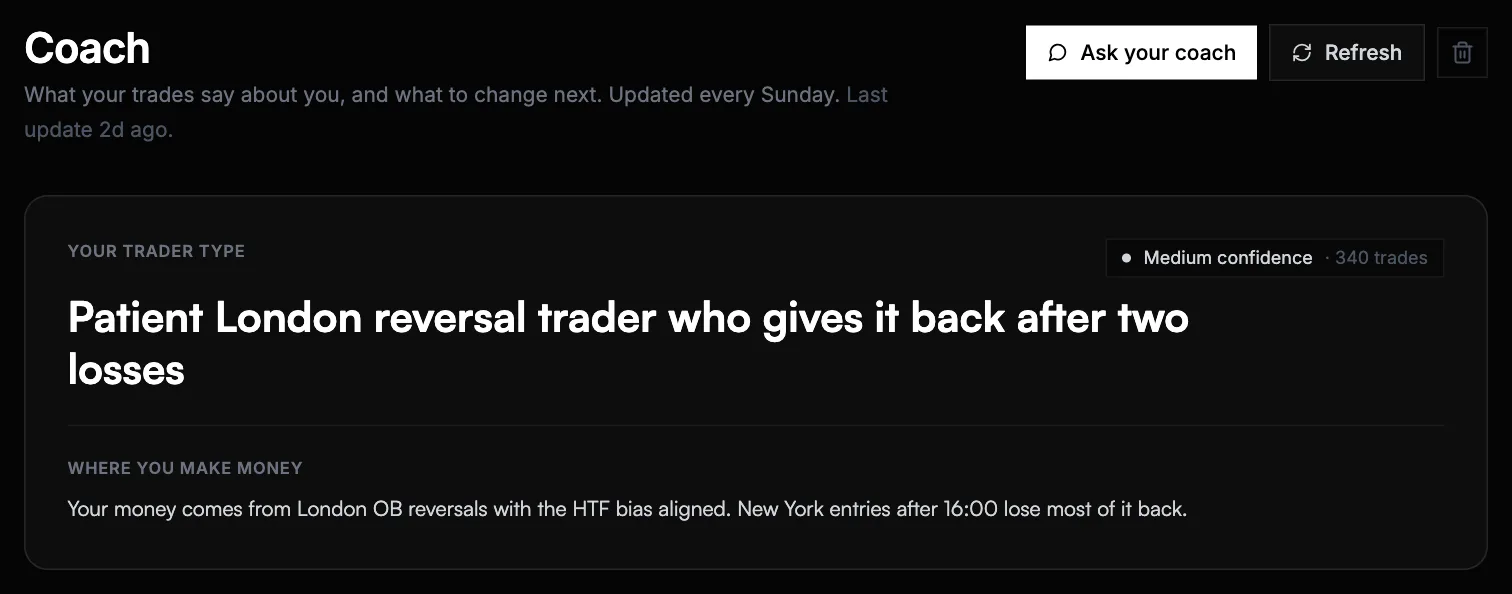
Open Coach from the top bar (on the phone, the Coach tab). The first card names the kind of trader your trades describe, for example patient London reversal trader who gives it back after two losses, and says in one line where you actually make money. It is rebuilt every Sunday from your latest trades, or right away with Refresh.
Apply one of your next steps
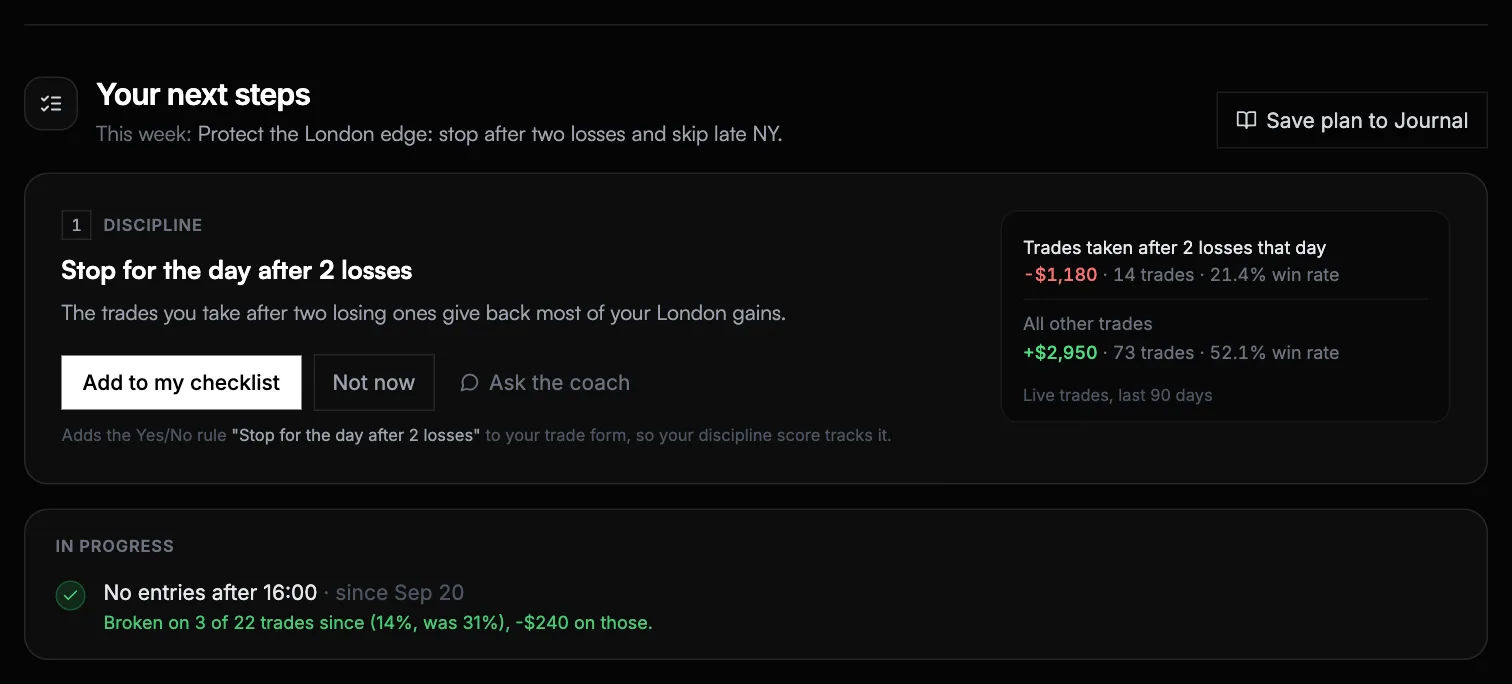
Your next steps lists up to three changes, each backed by your own numbers: the trades it is about next to all your other trades, with the money and win rate of each. Add to my checklist puts the rule on your trade form, so your discipline score starts tracking it. See it on your equity curve shows your curve with and without the change. Applied steps move to In progress, which tells you how often you have kept them since.
Test a rule in Strategy Lab
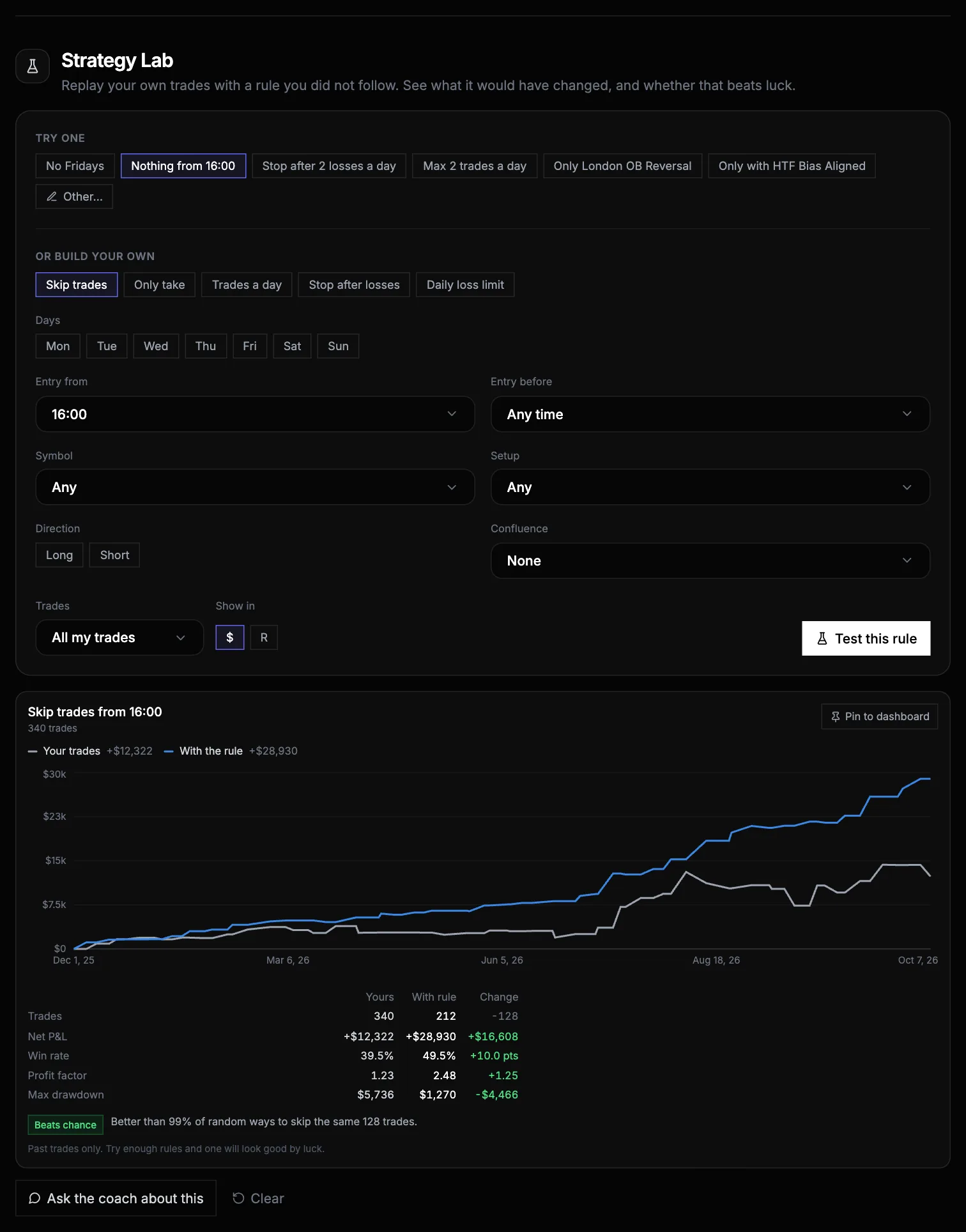
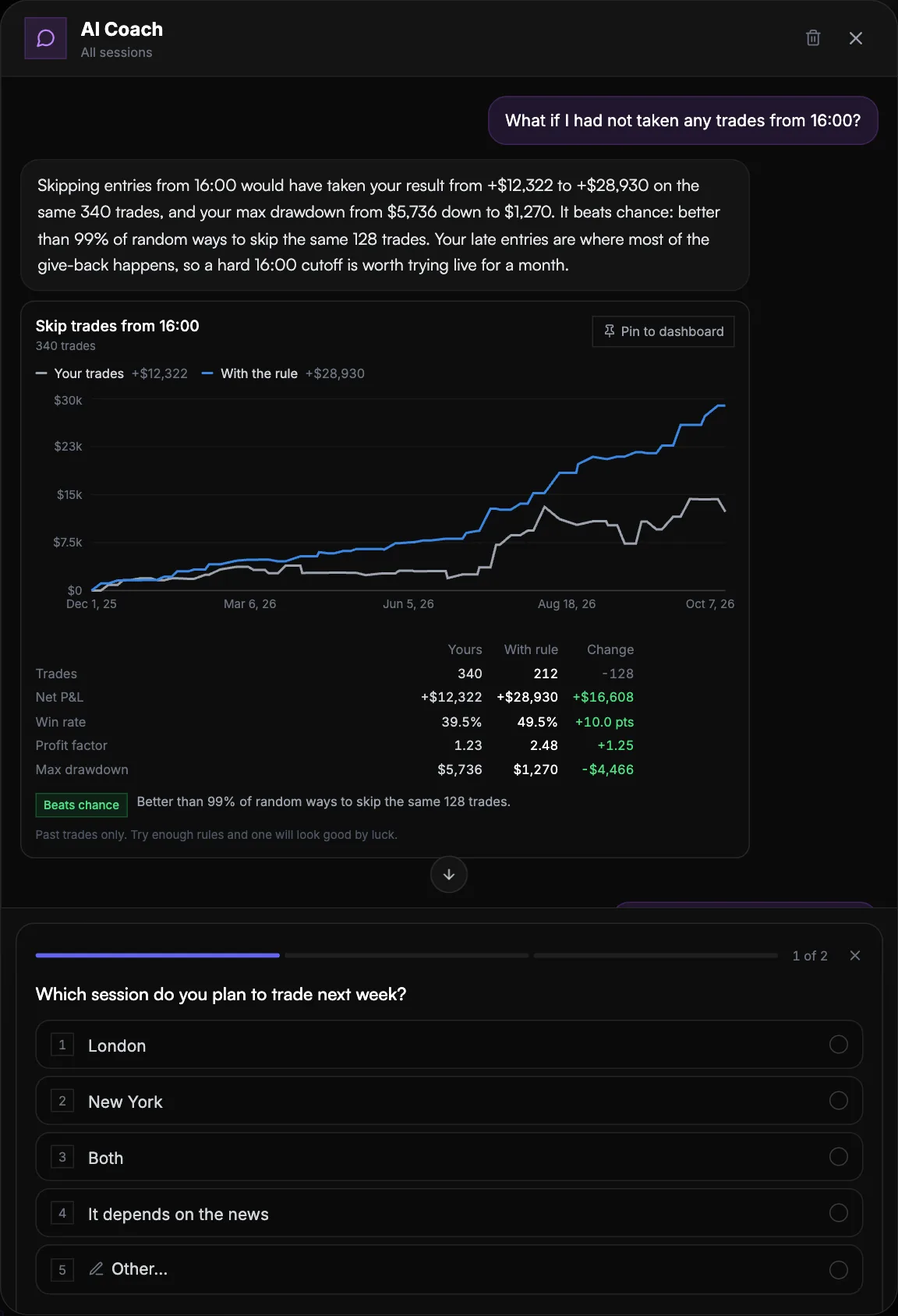
Pick a ready rule such as No Fridays or Stop after 2 losses a day, build your own with the buttons (days, entry hours, symbol, setup, long or short, a confluence), or press Other… and type it in your own words, like no shorts on gold after 15:00. You get your real equity curve next to the one with the rule, the numbers side by side, and whether the change beats luck.
Build your risk plan
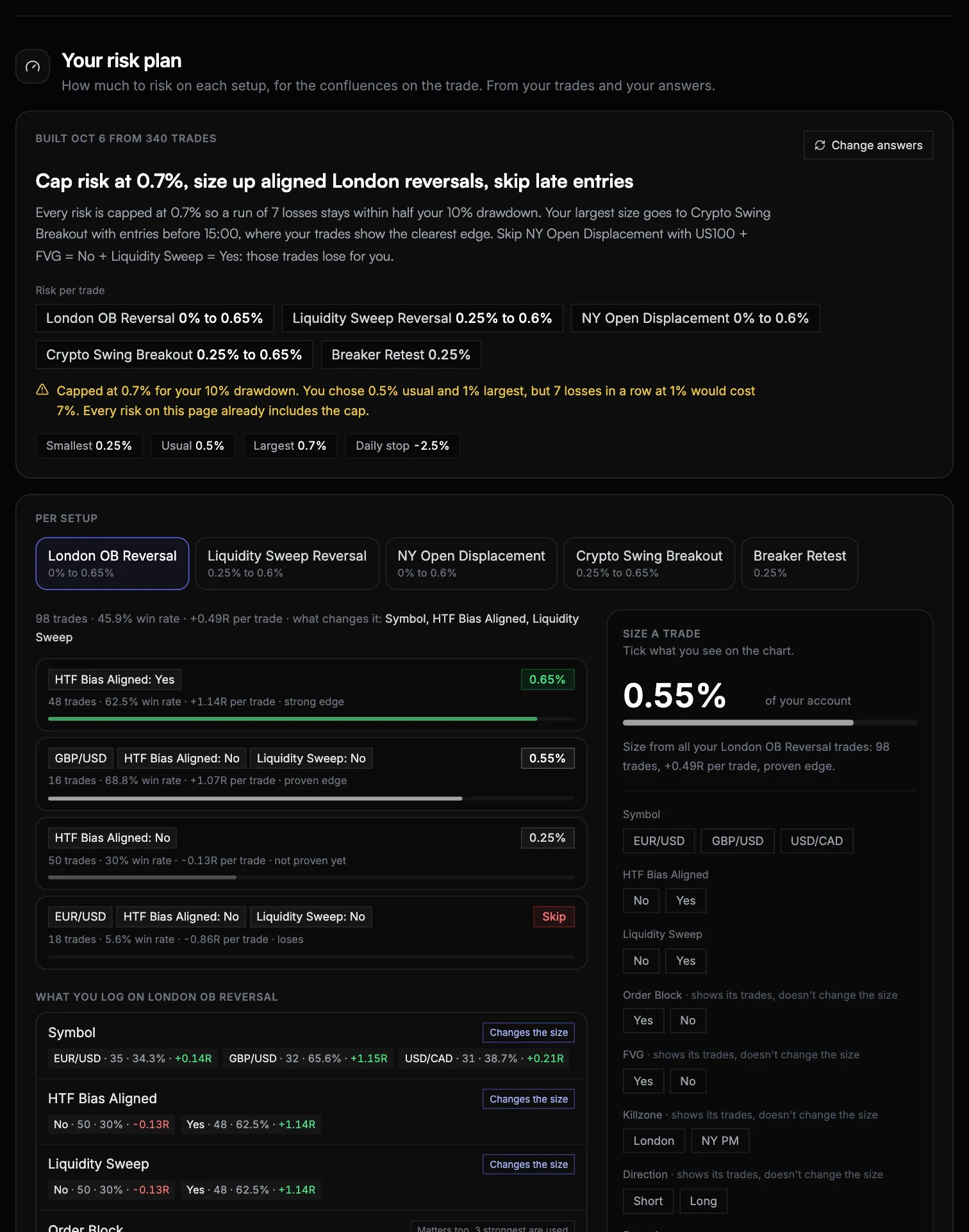
From 50 trades, live or backtest, press Build my risk plan and answer a few questions only you can answer, such as the most you would risk on your best setup and your challenge targets. The plan opens with Risk per trade for each setup, then lets you tick what is on your chart in Size a trade to get the risk for that exact trade.
Ask the coach anything
Press Ask your coach and ask in plain words: what is my best setup, show my P&L by weekday, what if I had stopped after two losses. Numbers come from your journal, charts are drawn from your trades and can be pinned to your dashboard. When the answer depends on something only you know, the coach asks first, with options you tap or your own answer.
Most journals tell you what happened. The Coach page tells you what to change, shows what that change would have done to your own trades, and how much to risk once you have changed it. This guide walks through each part in the order you would use them.
The Coach is part of the Pro and Premium plans. On the free plan you can open the page and see a preview of every section. To see it working before you log anything, the Coach demo runs the whole page on 340 sample trades, no account needed.
Before you start: what the coach needs from your trades
Everything on the page is computed from your journal, so what you log decides what it can see.
- A setup name on every trade. The risk plan and Strategy Lab work per setup. Reuse the same name (the trade form suggests your past ones).
- The entry time. Without it, nothing about hours can be tested: no "nothing after 16:00", no time rules in the risk plan.
- Your confluences, both answers. A Yes/No confluence only means something when there are trades with Yes and trades with No. If you only ever tick Yes, there is nothing to compare it with. The risk plan says so next to each confluence ("Only Yes is logged", "Logged on 24 of 143 trades").
- Enough trades. The trader profile starts at 5 trades, the risk plan at 50. Backtest trades count too, which is the fastest way to get there.
Strategy Lab: test a rule before you follow it
Every trader has rules they think would help: no Fridays, stop after two losses, only A+ setups. Strategy Lab replays your past trades as if you had followed the rule, so you see what it would actually have done.
There are three ways in:
- Try one. One click runs a ready rule, including ones built from your own setups and confluences ("Only London OB Reversal", "Only with HTF Bias Aligned").
- Build your own. Choose what the rule does (skip trades, only take some, cap trades a day, stop after losses, a daily loss limit), then the conditions: days, an entry window, symbol, setup, direction and a confluence value.
- Other… Type the rule as you would say it. The coach turns it into a rule, tells you what it read it as ("Read as: Skip XAU/USD shorts from 15:00") and fills the builder, so you can adjust it if it misunderstood.
How to read the result
- Two curves. Grey is what you actually did. Blue is the same trades with the rule.
- The table. Trades, net P&L, win rate, profit factor and max drawdown for both, with the change.
- The chance check. Skipping trades almost always changes the result, so the change alone proves little. The lab compares your rule with 2,000 random ways of skipping the same number of trades. Beats chance means it did better than at least 95% of them. Within noise means random skipping often does as well, so the data does not prove the rule. Too few means there are not enough trades on one side to tell.
A rule that beats chance is worth trying live. A rule within noise is not wrong, it is unproven. How to test a trading rule runs eleven common rules through this check and explains why most of them fail it.
What it cannot test
The lab decides which past trades would have been taken. It cannot know what would have happened inside a trade, so moving the stop to break-even, partial closes, trailing stops or a different target are out of reach for any journal. If you type one of those, it tells you why instead of guessing.
And the more rules you try, the more likely one looks good by luck. That is what the chance check is for: trust the ones that beat it, not the biggest number.
Found one you like? Pin to dashboard keeps the comparison on your dashboard, recalculated with every new trade, and Ask the coach about this opens the chat with the result.
Your risk plan: how much to risk on each setup
The risk plan answers one question: how much should this trade risk? It starts from the range you choose (your smallest, usual and largest risk) and places every setup inside it according to how proven its edge is in your own trades.
- Risk per trade at the top is the answer for each setup. A setup with a proven edge gets more, an unproven one gets your smallest risk, and one that clearly loses is marked Skip.
- Combinations, not single confluences. A setup can be sized differently for, say, HTF bias Yes with a liquidity sweep than for HTF bias No. A combination only gets its own size when it differs clearly from the rest, in both your older and your newer trades, so a short lucky run does not earn a bigger risk.
- Size a trade. Tick what you see on the chart and get the risk for that trade, plus how your past trades with exactly that combination went.
- The drawdown cap. The plan works out the losing run you should be ready for (the run that only gets longer about 1 time in 10 over 100 trades). If that run at your chosen size would use more than half your max drawdown, every risk is capped, and the plan says so at the top.
- Time and day. Your results by entry hour, weekday, losses earlier that day and trade of the day. When one of them is clearly worse, it becomes a rule that cuts your size or skips the trade.
- Your challenge. For a prop account, about how many trades each phase takes at this sizing, and a daily stop at half your daily loss limit.
- Checked on your newest trades. The plan is rebuilt from your older trades only, then run on the newest ones it has never seen, and judged per 1% risked. It either held up, did no better than one size on every trade, or is not proven yet. It says which.
Rebuild it every month or two with Change answers, as your trading changes.
The chat: questions in plain words
The coach in the chat reads your journal through the same numbers as your dashboard, so it never quotes a figure that disagrees with it. Some questions that work well:
- What is my best setup, and what makes it work?
- Show my P&L by weekday (it draws the chart; pin it to keep it)
- How much do I lose trading against the trend?
- What if I had stopped after two losses a day?
- How far am I from my challenge target, and how much can I lose today?
- What did I write in my notes about overtrading?
When a good answer depends on something only you know, like your schedule or what you want to fix first, the coach shows a few questions with options to tap, or room to type your own. Answering them does not use up a message.
Good to know
The coach and everything on this page work from your past trades. They can be wrong, and nothing here is financial advice: you decide what to risk and which rules to follow. The full terms are in our Terms of Service.
Ready to start journaling your trades?
Import trades directly from TradingView or log them manually — either way, your data builds your edge.
Start Free Trial